Based on the last session, on database mysql. we came up with a simulator database for an ecommerce site:
the schema is as follow:
Entities: products, orders and order_items
sql-- Create database if not existsCREATE DATABASEIF NOT EXISTS ecommerce;USE ecommerce;-- Products tableCREATE TABLE products(id VARCHAR(24) PRIMARY KEY,-- MongoDB ID formatname VARCHAR(255) NOT NULL,description TEXT,price DECIMAL(10, 2) NOT NULL,stock INT NOT NULL DEFAULT 0,category VARCHAR(100),image_url VARCHAR(255),created_at TIMESTAMP DEFAULT CURRENT_TIMESTAMP,updated_at TIMESTAMP DEFAULT CURRENT_TIMESTAMPONUPDATE CURRENT_TIMESTAMP,INDEX idx_product_name (name),INDEX idx_product_category (category));-- Orders tableCREATE TABLE orders (id VARCHAR(24) PRIMARY KEY, -- MongoDB ID formattotal_amount DECIMAL(10, 2) NOT NULL,status ENUM('pending', 'processing', 'completed', 'cancelled') DEFAULT 'pending',shipping_address_street VARCHAR(255),shipping_address_city VARCHAR(100),shipping_address_state VARCHAR(100),shipping_address_zip VARCHAR(20),shipping_address_country VARCHAR(100),created_at TIMESTAMP DEFAULT CURRENT_TIMESTAMP,updated_at TIMESTAMP DEFAULT CURRENT_TIMESTAMP ONUPDATE CURRENT_TIMESTAMP,INDEX idx_order_status (status),INDEX idx_order_created (created_at));-- Order items table (for order-product relationship)CREATE TABLE order_items(id INTAUTO_INCREMENT PRIMARY KEY,order_id VARCHAR(24) NOT NULL,product_id VARCHAR(24) NOT NULL,quantity INT NOT NULL,price DECIMAL(10, 2) NOT NULL,created_at TIMESTAMP DEFAULT CURRENT_TIMESTAMP,FOREIGN KEY(order_id) REFERENCES orders(id) ONDELETE CASCADE,FOREIGN KEY (product_id)REFERENCES products(id),INDEX idx_order_items_order(order_id),INDEX idx_order_items_product(product_id));-- Trigger to reduce product stock when order item is insertedDELIMITER //CREATE TRIGGER after_order_item_insertAFTERINSERT ONorder_itemsFOREACHROWBEGINUPDATE productsSET stock = stock - NEW.quantity,updated_at = CURRENT_TIMESTAMPWHERE id = NEW.product_id;END//-- Trigger to restore product stock when order is cancelledCREATE TRIGGER after_order_cancelAFTERUPDATE ON ordersFOR EACH ROWBEGINIF NEW.status = 'cancelled' AND OLD.status != 'cancelled' THENUPDATE products pINNER JOIN order_items oiON p.id = oi.product_idSET p.stock = p.stock + oi.quantity,p.updated_at = CURRENT_TIMESTAMPWHERE oi.order_id = NEW.id;ENDIF;END//-- Trigger to validate stock before order item insertionCREATE TRIGGER before_order_item_insertBEFOREINSERT ONorder_itemsFOREACHROWBEGINDECLARE available_stock INT;SELECT stockINTO available_stockFROM productsWHERE id = NEW.product_id;IF available_stock < NEW.quantity THENSIGNAL SQLSTATE '45000'SET MESSAGE_TEXT= 'Insufficient stock available';ENDIF;END//DELIMITER ;-- Create a view for order summariesCREATE VIEW order_summariesASSELECTo.id,o.status,o.total_amount,o.created_at,COUNT(oi.id) as total_items,GROUP_CONCAT(p.name SEPARATOR ', ') as productsFROM orders oLEFT JOIN order_items oi ON o.id = oi.order_idLEFT JOIN products p ON oi.product_id = p.idGROUP BY o.id;-- Indexes for performance optimizationCREATE INDEX idx_product_price ON products(price);CREATE INDEX idx_order_date_status ON orders(created_at, status);-- Sample insert statements for testingINSERT INTO products(id, name, description, price, stock, category)VALUES('507f1f77bcf86cd799439011', 'Test Product 1', 'Description 1', 29.99, 100, 'Electronics'),('507f1f77bcf86cd799439012', 'Test Product 2', 'Description 2', 39.99, 50, 'Books');INSERT INTO orders(id, total_amount, status)VALUES('507f1f77bcf86cd799439013', 29.99, 'pending');INSERT INTO order_items(order_id, product_id, quantity, price)VALUES('507f1f77bcf86cd799439013', '507f1f77bcf86cd799439011', 1, 29.99);

so we will use node to create an api route in which we will perform http methods to manipulate products, orders and order_items It works like this one can list a product then create an order for the cloth then list cloth_items for the respective order.
first create a directory:
bashmkdir commercecd commerce
Project Structure:
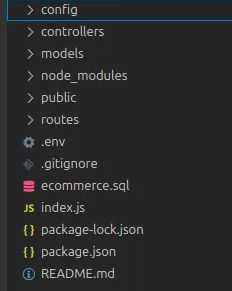
Initalize npm:
bashnpm init -y
Install the required dependencies:
bashnpm install dotenv express mysql2 nodemon redis swagger-ui-express swagger-jsdoc swagger-autogen
Mysql setup with mysql2:
javascriptrequire("dotenv").config();// config/database.jsconst mysqlConfig = {host: "localhost",user: "root",password: process.env.MYSQL_PASSWORD,database: "ecommerce",port: 3306,// Optional but recommended settingswaitForConnections: true,connectionLimit: 10,queueLimit: 0,};module.exports = { mysqlConfig };
Redis for caching setup
javascript// config/redis.jsconst redisConfig = {url: "redis://localhost:6379",// Optional configurationsocket: {connectTimeout: 10000,},};module.exports = { redisConfig };
setup your environment variables:
plain textMYSQL_PASSWORD = "your mysql password"PORT = 8000REDIS_URL = "redis://localhost:6379"
setup your index/server.js
javascriptconst express = require("express");const app = express();const PORT = process.env.PORT || 8001;app.use(express.json());app.get("/", function (req, res) {res.send("Hello, World!");});app.listen(PORT, () => {console.log(`Server running on port ${PORT}`);});
to run the server, either configure your package.json or run:
bashnode index.js or nodemon index.js
now that your server is running: setup your index.js
javascript// server.jsconst express = require("express");const mysql = require("mysql2/promise");const redis = require("redis");const { mysqlConfig } = require("./config/database");const { redisConfig } = require("./config/redis");const app = express();const PORT = process.env.PORT || 8001;app.use(express.json());async function initializeDatabases() {try {const mysqlConnection = await mysql.createConnection(mysqlConfig);console.log("MySQL connected successfully");const redisClient = redis.createClient(redisConfig);await redisClient.connect();console.log("Redis connected successfully");return { mysqlConnection, redisClient };} catch (error) {console.error("Database connection error:", error);process.exit(1);}}app.get("/", function (req, res) {res.send("Hello, World!");});async function startServer() {const { mysqlConnection, redisClient } = await initializeDatabases();const productRoutes = require("./routes/products")(redisClient,mysqlConnection);// const orderRoutes = require("./routes/orders")(redisClient, mysqlConnection);app.use("/api/products", productRoutes);// app.use("/api/orders", orderRoutes);app.use((err, req, res, next) => {console.error(err.stack);res.status(500).json({status: "error",message: err.message,});});app.listen(PORT, () => {console.log(`Server running on port ${PORT}`);});process.on("SIGINT", async () => {try {await mysqlConnection.end();await redisClient.quit();console.log("Database connections closed");process.exit(0);} catch (error) {console.error("Error during shutdown:", error);process.exit(1);}});}startServer();
create the product routes and the controllers with the functions:
Routes with endpoint for products
javascript// routes/products.jsconst express = require("express");const router = express.Router();const ProductController = require("../controllers/productController");module.exports = (redisClient, mysqlConnection) => {const productController = new ProductController(redisClient, mysqlConnection);router.get("/", productController.getAllProducts.bind(productController));router.get("/:id", productController.getProduct.bind(productController));router.post("/", productController.createProduct.bind(productController));router.put("/:id", productController.updateProduct.bind(productController));router.delete("/:id",productController.deleteProduct.bind(productController));return router;};
controllers with functions for updating products
utilised classes to use one connection for the database and to reduce the code base and avoid repitition of the connection:
javascriptclass ProductController {constructor(redisClient, mysqlConnection) {this.redisClient = redisClient;this.mysqlConnection = mysqlConnection;}async getAllProducts(req, res) {try {const [products] = await this.mysqlConnection.execute("SELECT * FROM products");res.json(products);} catch (error) {res.status(500).json({ error: error.message });}}async getProduct(req, res) {try {const { id } = req.params;// Check Redis cacheconst cachedProduct = await this.redisClient.get(`product:${id}`);if (cachedProduct) {return res.json(JSON.parse(cachedProduct));}// Get from MySQLconst [products] = await this.mysqlConnection.execute("SELECT * FROM products WHERE id = ?",[id]);if (products.length === 0) {return res.status(404).json({ message: "Product not found" });}const product = products[0];// Cache in Redisawait this.redisClient.set(`product:${id}`, JSON.stringify(product));res.json(product);} catch (error) {res.status(500).json({ error: error.message });}}async createProduct(req, res) {try {const { name, description, price, category, stock } = req.body;const id = Date.now().toString(); // Simple ID generationconst [result] = await this.mysqlConnection.execute("INSERT INTO products (id, name, description, price, category, stock) VALUES (?, ?, ?, ?, ?, ?)",[id, name, description, price, category, stock]);const [newProduct] = await this.mysqlConnection.execute("SELECT * FROM products WHERE id = ?",[id]);res.status(201).json(newProduct[0]);} catch (error) {res.status(500).json({ error: error.message });}}async updateProduct(req, res) {try {const { id } = req.params;const { name, description, price, category, stock } = req.body;const [result] = await this.mysqlConnection.execute("UPDATE products SET name = ?, description = ?, price = ?, category = ?, stock = ? WHERE id = ?",[name, description, price, category, stock, id]);if (result.affectedRows === 0) {return res.status(404).json({ message: "Product not found" });}// Invalidate Redis cacheawait this.redisClient.del(`product:${id}`);const [updatedProduct] = await this.mysqlConnection.execute("SELECT * FROM products WHERE id = ?",[id]);res.json(updatedProduct[0]);} catch (error) {res.status(500).json({ error: error.message });}}async deleteProduct(req, res) {try {const { id } = req.params;const [result] = await this.mysqlConnection.execute("DELETE FROM products WHERE id = ?",[id]);if (result.affectedRows === 0) {return res.status(404).json({ message: "Product not found" });}// Invalidate Redis cacheawait this.redisClient.del(`product:${id}`);res.json({ message: "Product deleted successfully" });} catch (error) {res.status(500).json({ error: error.message });}}}module.exports = ProductController;
Implement API routes for order?
Test the endpoints using Postman, curl or Thunder Client?
Explore swagger and other API documentation techniques?
Containerize this application and/or try deploying it?